RDP Regularizer
Regularizes jittery Redis streams onto a UTC grid, fills gaps by imputation or forecast, and writes a strictly regular output stream.
RDP Regularizer
Measurement streams from the data crawler arrive on Redis with jittery timestamps and gaps. This service reads those streams, snaps samples onto a UTC grid epoch + k * update_interval (epoch is 1970-01-01), fills missing steps by imputation or forecast, and writes a strictly regular output stream that downstream consumers can unpack. Each configured channel runs in its own worker thread. Optional TimescaleDB history can bootstrap the in-memory window at startup so the grid does not start empty.
Requires Python >=3.10.
How it works
TimeGridRegularizer advances a monotonic frontier. Each grid point is finalized once, in order, as measured, imputed, or forecast. Late measured values may re-emit corrections that upgrade imputed/forecast points still held in the in-memory window; the frontier does not rewind.
- Incoming samples snap to the nearest grid point when
|timestamp - grid| <= jitter_tolerance(default0.5 * update_interval). If several samples map to the same point, the closest wins; farther ones are dropped. - measured — a snapped sample is pending for that grid point.
- imputed — an interior gap: later measured data is already pending. The
defaultimputer is last observation carried forward, then next observation, through the last known value (trailing holes stay empty). - forecast — no data by the deadline
grid_time + lag_time. Thedefaultforecaster repeats the last history value (else NaN). - Optional TimescaleDB bootstrap replays raw history into that window and publishes it to the output stream before live polling starts.
Architecture
Each poll tick drains the Redis backlog, regularizes onto the grid, and writes one output entry.
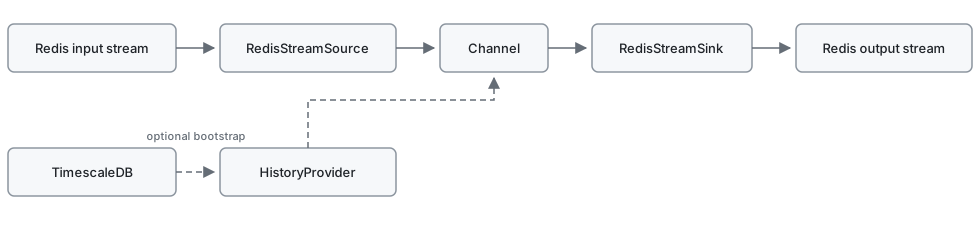
Each scheduled tick runs Channel._step:

Polling is aligned to epoch + k * polling_interval + offset.
Package layout
| Path | Role |
|---|---|
regularizer/__main__.py |
CLI: load config, start channel threads |
regularizer/channel.py |
Per-channel scheduler and I/O wiring |
regularizer/regularizer.py |
Time-grid regularization and late corrections |
regularizer/config.py |
ChannelConfig / HistoryProviderConfig |
regularizer/io/ |
Redis stream source and sink |
regularizer/history/ |
Timescale fetch and in-memory history store |
regularizer/tools/ |
Imputer and forecaster registries |
Configuration
The process loads YAML through pyrdp_commons.cli.setup_app. Paths can be set on the CLI or via environment variables:
| Option | Env var | Default | Role |
|---|---|---|---|
-c / --config |
REGULARIZER_CONFIG |
config.yml |
YAML config file |
--env |
REGULARIZER_ENV |
unset | optional dotenv file for !env-template substitution |
YAML values may use !env-template "${VAR}" (see docker/etc/regularizer/config.yml). A full example is in docs/config.md.
Durations (ms, s, m, h, d, w, e.g. 30s, 1m); bare numbers are seconds.
| Section | Keys |
|---|---|
redis |
host, port, db, optional password |
timescale |
host, port, db, user, password — required if any channel has history_provider |
channels.<name> |
required: input_stream, output_stream, polling_interval, update_interval, window |
optional: jitter_tolerance, offset, lag_time, output_maxlen (200), data_provider_name (rdp-regularizer), imputer / forecaster (default; string name or mapping {name, ...}) |
|
history_provider |
omit or null to skip bootstrap; else dp_name plus optional dp_location_code, dp_unit, dp_data_provider, dp_device_id, init_when_source_available, bootstrap_delay (default 10s) |
Imputation and forecast strategies
| Value | imputer |
forecaster |
|---|---|---|
default / const_fill |
last observation carried forward, then next observation | repeats the last history value |
linear |
linear interpolation between the bounding values | not available (needs a right bound) |
daily_naive |
same time of day on the nearest known day | same time of day on preceding days |
knn |
distance-weighted average over the k most similar days |
same, extrapolated past the last measurement |
soft_threshold_svd |
low-rank completion of the day-by-slot matrix | same, extrapolated past the last measurement |
chronos_bolt |
not available | zero-shot Chronos-Bolt (CPU); opt-in extra |
chronos_2 |
not available | zero-shot Chronos-2, univariate (CPU); opt-in extra |
daily_naive, knn, and soft_threshold_svd reshape the window into a day-by-slot matrix, so update_interval must divide a day evenly and window should span several days. With less than a day of history every column holds a single value and these strategies yield NaN.
imputer and forecaster may be a name, or a mapping whose name is that value and whose other keys are constructor kwargs:
forecaster:
  name: knn
  k: 7
chronos_bolt and chronos_2 are optional; see Chronos forecasters.
Chronos forecasters
Chronos-Bolt and Chronos-2 are optional. They are not installed by default, in CI, or in the service Docker image. Default uv sync / uv run pytest stay extra-free; tests mock the pipelines and do not download Hub weights.
To use them locally:
uv sync --extra chronos
The extra installs chronos-forecasting and a CPU-only PyTorch wheel. Pipelines always run on CPU (device_map='cpu', float32). If the extra is missing, import raises a hint to install it that way.
Set forecaster: chronos_bolt or forecaster: chronos_2 on a channel, or a mapping with constructor kwargs. Defaults apply when omitted.
model_path is which weights to load. cache_dir is only where Hub downloads go. They are not interchangeable.
Hub model (download amazon/chronos-bolt-tiny or another id). Set model_path to the Hub id. Set cache_dir if you want a non-default download cache (HF_HUB_CACHE, else ~/.cache/huggingface/hub).
forecaster:
  name: chronos_bolt
  model_path: amazon/chronos-bolt-small
  cache_dir: /var/cache/huggingface
Local snapshot (a directory that already contains config.json and model.safetensors). Set model_path to that directory. Do not put the snapshot in cache_dir: that still loads the default Hub id and writes Hub cache files into the folder.
forecaster:
  name: chronos_bolt
  model_path: /path/to/snapshot
Both are zero-shot and univariate (no covariates):
- Interior holes through the last known value are interpolated (forward then back fill).
- The trailing horizon is predicted; the point forecast is the median quantile (
0.5). - Known values are left untouched.
forecaster |
Pipeline | Default Hub model |
|---|---|---|
chronos_bolt |
Chronos-Bolt | amazon/chronos-bolt-tiny |
chronos_2 |
Chronos-2 | amazon/chronos-2 |
Redis I/O
Input (regularizer/io/source.py): JSON fields _time and _value (scalar or arrays of equal length); optional _metadata. The cursor starts at the current stream tip, so Redis history is not replayed. Malformed entries are skipped and the cursor still advances.
Output (regularizer/io/sink.py): one XADD per poll batch, maxlen=output_maxlen, approximate=True. Fields are JSON arrays valid_time, value, quality. data_provider is data_provider_name. With a history provider, identity fields (name, location_code, unit, device_id) come from dp_* when set; otherwise name is the channel key.
Run
Copy the example from docs/config.md to config.yml, then:
uv sync
python -m regularizer
Override paths with -c / --config and --env, or with REGULARIZER_CONFIG and REGULARIZER_ENV:
python -m regularizer -c /path/to/config.yml --env /path/to/.env
REGULARIZER_CONFIG=/path/to/config.yml REGULARIZER_ENV=/path/to/.env python -m regularizer
Ctrl+C sets the stop event and joins channel threads (10s timeout). Logging is configured from the same YAML via pyrdp-commons.
Development
uv run pytest
Chronos is optional and is not installed by uv sync or uv run pytest. See Chronos forecasters.
pyproject.toml sets Hatchling allow-direct-references so the git pyrdp-commons dependency can be built.
Funding Acknowledgments
 Parts of this development have been supported by the REFORMERS project of the European Union’s research and innovation programme Horizon Europe under the grant agreement No.101136211. Parts of this development have been supported by the CELINE project of the European Union’s research and innovation programme Horizon Europe under the grant agreement No.101160667.